ArkVault: A BorgBackup GUI Where the Drive Rebuilds Your Linux Box
- Category
- Tools & Downloads
- Posted
- July 11, 2026
- Updated
- September 16, 2026
- By
- Jacob Lloyd — written with AI assistance, post-project
- Read time
- 12 min read
In plain terms: A free backup program for Linux computers with a simple point-and-click window. It saves an encrypted copy of your important files to an external drive, and the drive itself carries a step-by-step recovery guide, so if your computer dies, a brand-new machine can be rebuilt straight from the drive.
Plug a backup drive into a fresh Linux install with nothing configured and get more than your files back. ArkVault writes a guided restore kit onto the drive next to the encrypted backup, so the drive itself knows how to rebuild the machine: dotfiles, SSH keys, launcher symlinks, systemd units, the works.
TL;DR
- What it is: a GTK4 GUI (plus a full headless CLI) around BorgBackup that writes an install-map manifest and a copy of itself onto every backup drive.
- What it costs: free, MIT licensed. Source zip below. No account, no cloud.
- What you need: Linux with GTK4/libadwaita (stock on Fedora/GNOME, one apt line on Debian/Ubuntu), a spare drive, and an evening to edit the catalog of what's worth capturing.
- What you end up with: an encrypted, deduplicated backup plus a restore wizard that runs off the drive on a machine with nothing installed. I tested restore in a sandbox drill (8/8 items landed in a fresh home).
- What it costs to run: on my own machine a nightly run usually takes about a minute. The last time Borg printed totals (9 Sept 2026), 188 GB of snapshots deduplicated to 18 GB; a week later the repo takes 31 GB on disk, partly because ArkVault never runs
borg compact(see Gotchas).
What you end up with
These screenshots come from a sandboxed run with dummy data, not my real machine's file list.
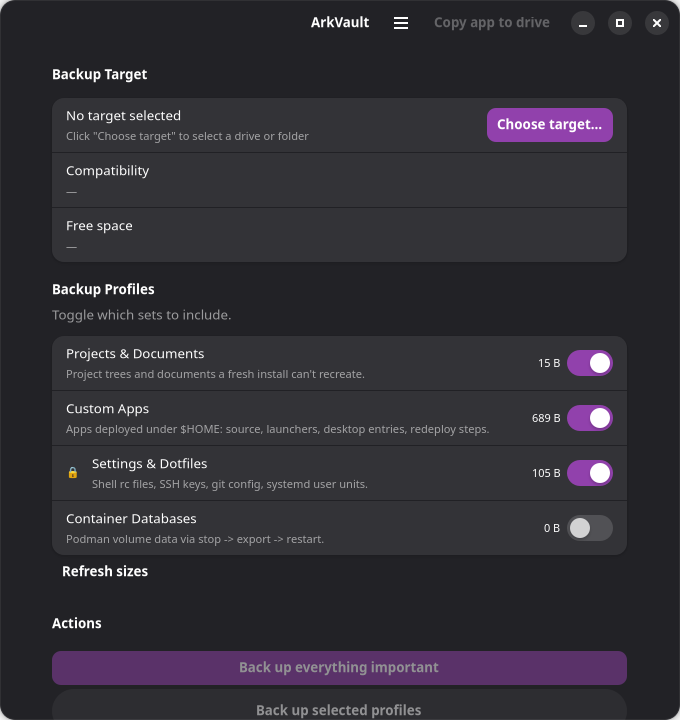
Four profiles, live size estimates, a lock badge wherever a profile touches secret-flagged items like SSH keys. One button backs up everything you've toggled on.
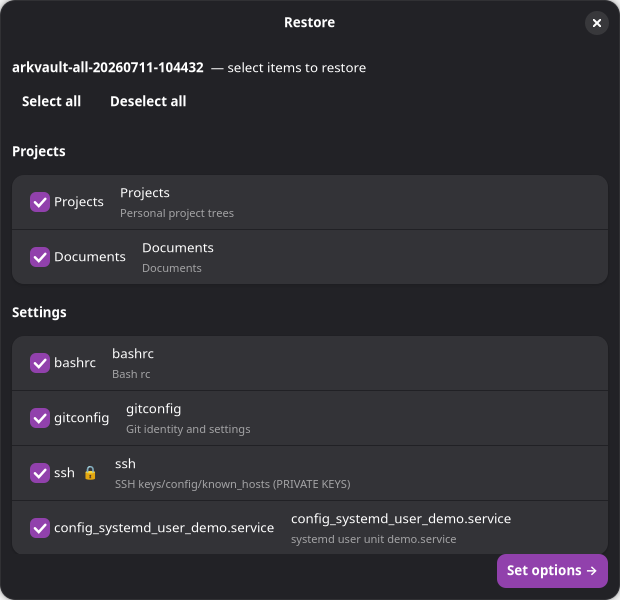
This is the point of the whole tool: the restore wizard reads the install-map off the drive and shows exactly what got captured, grouped and checkable, lock icon on anything sensitive.
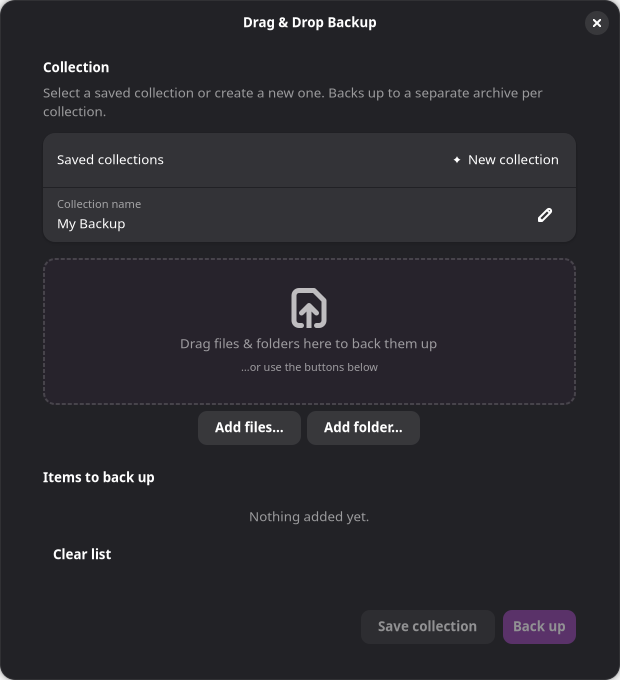
There's also a drag-and-drop mode for one-off collections that don't belong in the main catalog.
| Metric | Value |
|---|---|
| Code | ~7,900 lines of Python, 50 files in the zip |
| Pip dependencies | Zero. GTK comes from the system, requirements.txt is intentionally empty |
| Test suite | 93/93 checks pass, no pytest needed |
| Zip size | 116 KB (Borg's binary isn't bundled; the installer fetches it) |
| Sandbox restore drill | 8/8 items landed correctly in a second, fresh $HOME |
| Nightly run time, my machine | 51 s to 1 min 31 s wall clock (3–15 Sept 2026) |
| Items per nightly run | 222–225 (11–16 Sept 2026) |
| Dedup, my repo | 188.45 GB of snapshots stored as 18.24 GB (9 Sept 2026) |
| License | MIT, free |
What Borg actually buys you
ArkVault isn't its own backup engine. It's a front end around BorgBackup, which does the hard parts:
- Encryption: repokey-blake2. The key lives inside the repo, protected by your passphrase. Whoever steals the drive gets nothing.
- Deduplication: content-defined chunking, so ten snapshots of a slowly-changing home directory don't cost ten times the space.
- Compression: zstd at level 6. Decent squeeze without slowing the backup to a crawl.
- Retention:
borg prunekeeps 7 daily, 4 weekly and 6 monthly snapshots by default (configurable), so old snapshots age out and the drive doesn't fill up.
Why an immutable distro forced a different design
I built this on Bazzite, an immutable, atomic Fedora with a read-only root. The machine has since moved to Bluefin, which has the same constraints. That constraint shaped the whole tool:
- Everything installs under
~/.local. Nothing touches/. - The venv is built with
--system-site-packagesso GTK4/PyGObject comes from the host instead of compiling bindings against a read-only base. pip install borgbackupdoesn't work here (no liblz4 headers, no matching wheels), which is why the installer downloads the official upstream standalone Borg binary, a PyInstaller build with FUSE bundled in.- No
sudoanywhere. The one operation that needs root, formatting a drive, goes through a polkit/pkexec prompt.
The actual idea: the drive rebuilds the machine
Borg doesn't know which files matter, what permissions they need, or what has to happen after the files land for the machine to work again. Ordinary backup tools give you files back, and you still have to remember where everything went and which systemd units to re-enable. ArkVault writes that knowledge onto the drive on every backup:
arkvault-repo/: the encrypted Borg repository.ArkVault-App/: a self-bundled copy of ArkVault, source and installer, copied atomically (tmp dir, then rename) so an interrupted copy never leaves a half-app on the drive.arkvault-install-map.jsonplusRESTORE-README.md: a manifest of everything captured and a plain-text walkthrough you can read with zero tooling.
The install-map marks which items are secret. It never contains their contents.
What a backup run actually does
A backup run is a straight line: discover what the catalog matches (missing paths get skipped), optionally quiesce write-heavy services so live databases land consistent, borg create, borg prune, then write the restore kit to the drive.
The second copy: a plain folder mirror
A Borg repo is deduplicated, encrypted and opaque. To read it you need Borg or ArkVault, which is fine until you're standing in front of a machine that has neither.
So there's a second mode, arkvault mirror, that writes plain $HOME-relative folders to a drive instead. Restoring is bash <drive>/restore.sh, or literally dragging the folders back. You get one current copy, with no history and no deduplication.
Two things stop "just copy the folders" from being naive:
- Secrets still get encrypted. exFAT has no Unix permission bits, so a copied
.sshcomes back world-readable. Every secret-flagged item goes into one gpg-encrypted tar instead (tar keeps the perms the filesystem can't), andrestore.shunlocks it and re-chmods on the way out. - exFAT is case-insensitive. A tree holding both
Foo/andfoo/gets silently merged into one on copy, which is data loss that looks like success. ArkVault scans for case collisions and illegal characters up front and stores those trees losslessly as.tar.gzinstead, with the reason recorded in the manifest.
Both modes write the same restore kit onto the drive, so either one hands the next machine a map.
The paranoid parts
Most of the work went into these safeguards:
- The format guard refuses the system disk. Formatting the wrong drive is the classic backup-tool disaster. ArkVault resolves LUKS/LVM device-mapper chains down to physical disks by walking
/sys/class/block/*/slaves, because an encrypted root's mapper name looks nothing like the underlying disk, so naive name checks miss it. If it can't enumerate the system disks at all, it fails closed and refuses to format anything. You still type the exact device name to confirm. - Path containment on restore. A malformed or tampered install-map can't write outside the target home: symlinked ancestors get resolved, the leaf symlink is deliberately not followed, and redeploy targets that try to escape home are refused.
- Secret hygiene in logs. The passphrase and anything registered as secret get scrubbed by literal match plus regex backstops for patterns like
apiKey:andBearer. - The recovery sheet. First backup shows a passphrase sheet with non-selectable text, so nothing lands on the clipboard by accident, and the dismiss button stays disabled until you tick "I have saved my passphrase." The sheet never gets written to the drive. If you lose the passphrase, the backup is gone for good.
- FAT32 is refused as a repo target because its 4 GB file cap breaks Borg. exFAT is allowed with a warning, since Borg stores Unix metadata internally anyway.
- Empty archives are refused. If every source path vanished (drive unmounted, catalog typo), ArkVault refuses to write an empty archive that would look like a success.
- Verifying is on you, whenever you want.
borg checkruns from the UI or CLI as a real integrity check, and "Browse snapshot" mounts an archive read-only over FUSE so you can poke through it before you trust it.
Setting it up
You need GTK4/libadwaita PyGObject bindings, udisks2, and polkit. Stock on Fedora/GNOME family; one line on Debian/Ubuntu:
sudo apt install python3-gi gir1.2-gtk-4.0 gir1.2-adw-1Then the installer, which is idempotent and safe to re-run:
bash install.shThat copies the app to ~/.local/share/arkvault, builds the --system-site-packages venv, downloads the official Borg standalone binary, and drops ~/.local/bin/arkvault plus a desktop entry. Then:
arkvault probeEverything should say OK. Bare arkvault launches the GUI; the same core also drives a headless CLI:
arkvault probe|backup|restore|list|checkThe one step that actually matters: edit the catalog. The shipped one is a generic example. core/discovery.py, profiles.py, core/quiesce.py, core/containers.py and core/installmap.py all have marked "EDIT ME" blocks. A curated list of what a fresh install can't hand back is the whole point, and nobody can write yours for you.
The catalog itself is plain Python in core/discovery.py. Each entry is a path relative to your home, a secret flag and a note. Paths are probed at run time, so listing something you don't have is harmless. This is the shipped settings list:
_SETTINGS = [
    (".bashrc", False, "Bash rc"),
    (".gitconfig", False, "Git identity and settings"),
    (".ssh", True, "SSH keys/config/known_hosts (PRIVATE KEYS)"),
    (".config/rclone", True, "rclone remotes (may embed tokens)"),
]
Apps you deploy under your home can also carry redeploy steps that the restore wizard replays or puts on the manual checklist. The same file ships this worked sample, commented out, for a Node app:
redeploy = {"steps": [
    {"kind": "npm", "dir": "my-node-app", "cmd": "npm ci"},
    {"kind": "symlink", "link": ".local/bin/my-app",
     "target": "my-node-app/cli.js"},
    {"kind": "desktop-entry",
     "path": ".local/share/applications/my-app.desktop"},
    {"kind": "privileged-script", "script": "my-node-app/install.sh",
     "via": "pkexec", "manual": True,
     "desc": "Installs udev rules / system units (needs root)"},
]}
I trimmed a few shell rc files from the first list. The zip's version also has a Python-venv step ("kind": "pip").
Run the first backup, save the recovery sheet somewhere that isn't the backup drive, and click "Copy app to drive." For unattended runs there's a systemd user timer template in README-SETUP; it reads the passphrase from the keyring or ARKVAULT_PASSPHRASE.
The restore drill (sandbox)
I haven't restored my real machine from this drive. What I did run is a full drill in a sandbox, against a fake $HOME, using the exact tree in the zip:
- Unzipped the source, ran
install.sh, which did a real 27.9 MB Borg download. arkvault probe: all OK.arkvault backupof 3 example profiles into a scratch drive directory: 8 items in, repo initialized with repokey-blake2, install-map + RESTORE-README + self-bundle written.arkvault list, thenarkvault check: passed.arkvault restoreinto a second fresh home: all 8 items landed at the right paths, manual checklist printed for the rest.
The dependency-free test suite goes 93/93 on the same tree. That proves the mechanics on example data. It doesn't prove a restore of a large, real home directory.
Numbers from my own machine
The same tool backs up my own machine every night at 02:00 from a systemd user timer. These figures come from that unit's journal and from Borg's own --stats output:
| What | Value |
|---|---|
| Items captured per run | 222–225 (11–16 Sept 2026) |
| SQLite databases snapshotted first | 27–39 per run, 1.4–1.7 GB (11–16 Sept 2026) |
| One snapshot (9 Sept 2026) | 17.45 GB original, 14.12 GB compressed, 1.62 GB new after dedup |
| All snapshots (9 Sept 2026) | 188.45 GB original, 146.78 GB compressed, 18.24 GB deduplicated (about 10×) |
| Repo size on disk (16 Sept 2026) | 31 GB |
| Nightly wall clock, 3–15 Sept 2026 | 51 s to 1 min 31 s |
| Nightly wall clock, 16 Sept 2026 | 3 min 8 s |
| Memory peak | 1.7–2.6 GB (3–16 Sept 2026) |
Each night adds only 0.85–1.6 GB of new data to the repo, which is why daily snapshots of a 15–18 GB source set stay cheap. I haven't pinned down why the 16 September run took three times as long. The gap between the 18 GB Borg reported on 9 September and the 31 GB on disk a week later has two parts I can name but haven't measured separately: seven more nights of new data, and pruned snapshots whose space Borg never handed back, because Borg frees repository space only when borg compact runs, and ArkVault never runs it. On the three nights that logged these stats, Borg exited with warnings (exit code 100). ArkVault records that as a warning, not as a clean success.
Gotchas
- The zip fixes a bug the original install script had. Borg's GitHub releases ship a GPG
.ascsignature but no.sha256sidecar, so the installer's checksum fetch 404'd andset -ekilled the install before the script's own fallback could run. Fixed here, plus an optionalARKVAULT_BORG_SHA256env var to pin a known-good hash. My own box never hit it, because my Borg binary already existed, so the download branch simply never ran. - FAT32 will quietly ruin your week. ArkVault detects and refuses it, but plenty of USB drives ship that way out of the box.
- Pruning doesn't shrink the repo on its own. ArkVault runs
borg pruneafter every backup but neverborg compact, and current Borg (1.4.4 on my machine) only frees that space when compact runs. Runborg compacton the repo now and then, or add it to your timer. - A crashed run leaves a stale repo lock.
borg break-lockclears it (there's a button in the GUI), andBORG_LOCK_WAIT=120makes overlapping runs wait instead of failing instantly. - Live SQLite in WAL mode needs the db, wal, and shm files captured together, or the service stopped first. That's why the quiesce step exists. Its restart is in a
finallyblock, so services come back even if the backup dies mid-run. - Restoring into a different username works, because every destination is recorded relative to home. Ownership that can't be mapped onto the new user lands on the manual checklist instead of getting silently skipped.
- No GNOME keyring (headless box, CI)? It degrades to an in-memory passphrase plus a prompt instead of failing.
- The boring bug:
python -m arkvault backup ...used to silently do nothing: the GUI's argument parser ate the subcommand and exited 0.__main__.pynow dispatches CLI subcommands explicitly. Check that a backup command actually wrote an archive, not just that it exited 0. - Uninstalled tools stay in your catalog. After I removed a tool, every nightly run warned that its folder was listed but missing. ArkVault keeps going, backs up everything else and repeats the warning in the run summary. The fix is to delete the entry from your catalog.
- The shipped catalog is a blank example on purpose. The one I actually run lists exactly where my important stuff lives, which is precisely what shouldn't ship in a public zip. You get a clean Projects/Settings example with a worked redeploy sample instead (shown above under Setting it up): same structure, none of my paths.
Related: how to have an LLM adapt any project to your system and the stack it backs up. ArkVault was written with AI coding agents.
Downloads
Free for personal use. If it saves you an afternoon, the coffee button's nearby.