DisPatch: A Self-Hosted Chat App for Local AI Agents
- Category
- AI & Local LLM
- Posted
- July 11, 2026
- Updated
- October 9, 2026
- By
- Jacob Lloyd — written with AI assistance, post-project
- Read time
- 14 min read
In plain terms: DisPatch is a chat app that runs on your own computer and works from every phone and laptop in the house. You use it to talk to AI assistants that also run on that computer, and to drop files onto it so the assistants can work with them. A PIN keeps the powerful assistants locked away, so a shared family device only reaches a safe subset.
DisPatch is the app I built so I could stop running a 30-container Rocket.Chat install just to text my own AI agents. It is one Python process and one SQLite file. Every device in the house can reach it, agents reply into threads like people do, and anything I drop on it from my phone lands on the machine the agents live on. Version 2.0.0 shipped on 2026-10-09: the download is a 3 MB zip whose own test suite runs 1,915 tests green. This page covers what it does, how replies get to your phone exactly once, and how the PIN lock keeps a family tablet away from agents that can change real things.
TL;DR
- What it is: a self-hosted web chat for local AI agents (an OpenClaw gateway, or a model API you point it at), plus a drag-drop file drop, usable from any device that can reach the host.
- What it costs: $0. No SaaS seat, no account.
- What you need: Linux with Python 3.12+ and
uv, or Docker. OpenClaw only if you want agents that use tools. - What you get: per-bot threads, live streaming replies with a Stop button, regenerate and edit, a file drop, embeddable tools and apps, ten themes, a server-enforced Safe Mode behind a PIN, and a push API for cron jobs.
- The download: the 2.0.0 release, the same tree as the
v2.0.0tag in the public repo. MIT licence.
What it does
The screenshots come from a sandboxed copy with dummy data. The first four are from 2.0; the Safe Mode and File Server shots are from the July build, and those screens work the same way in 2.0.
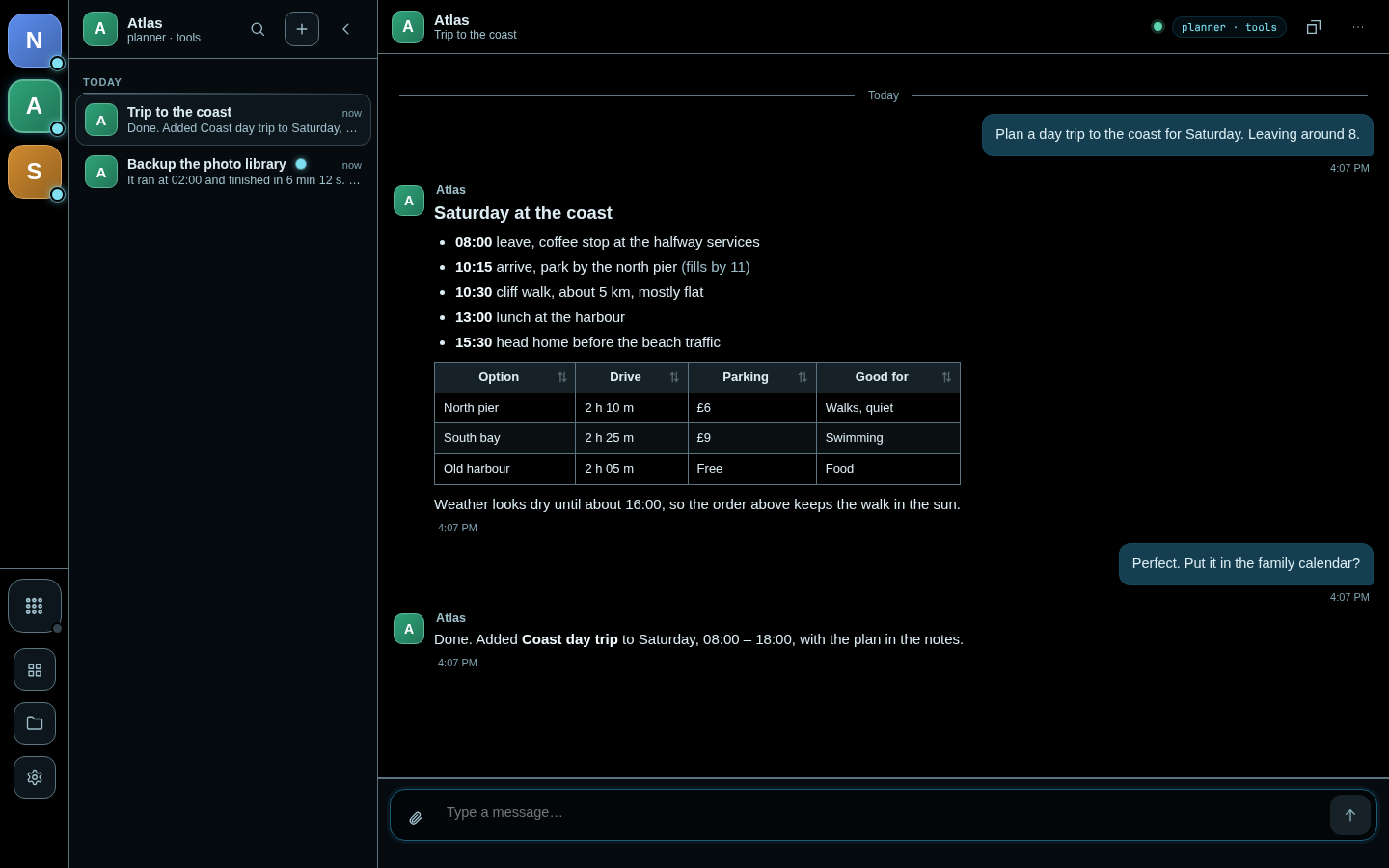
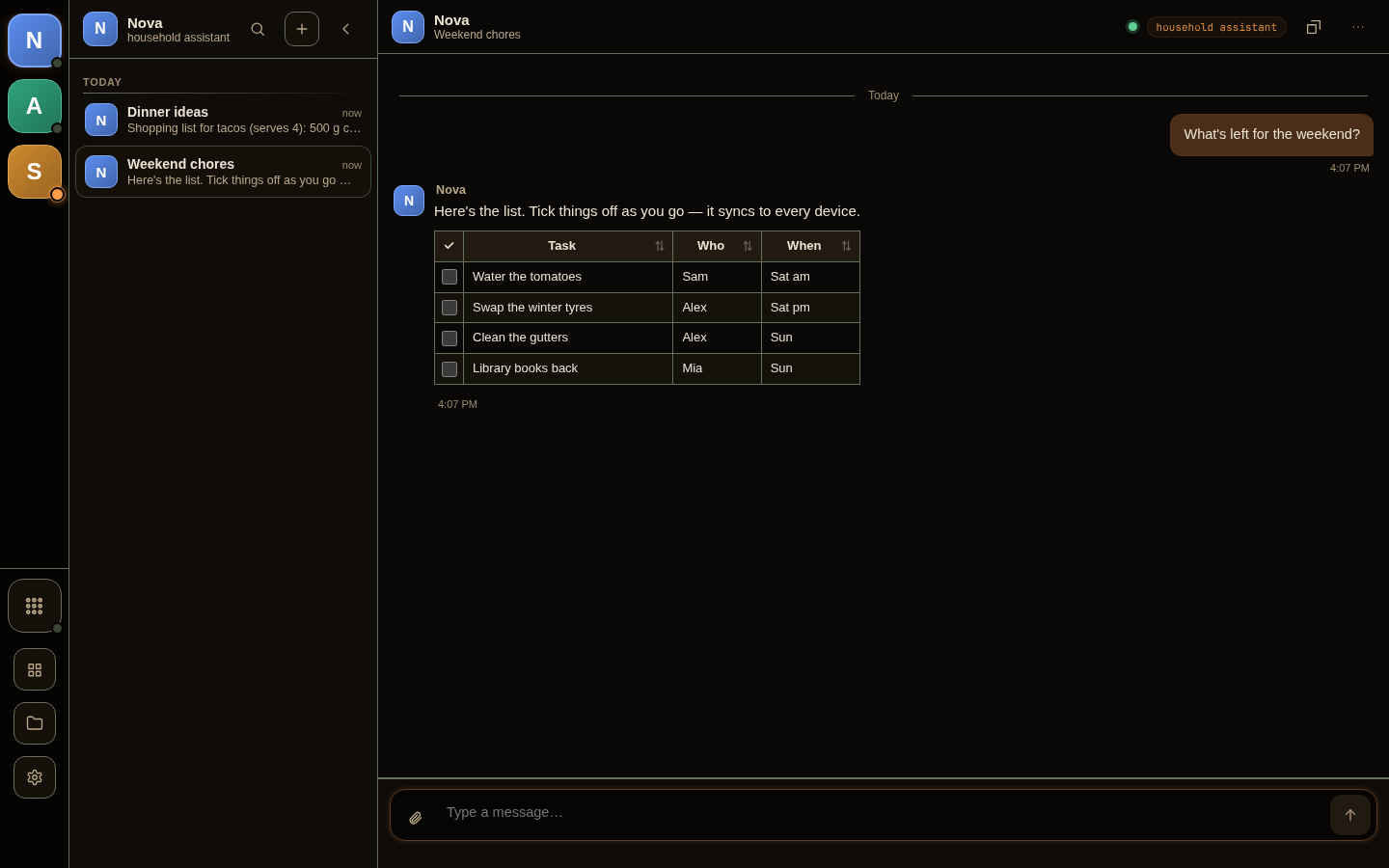
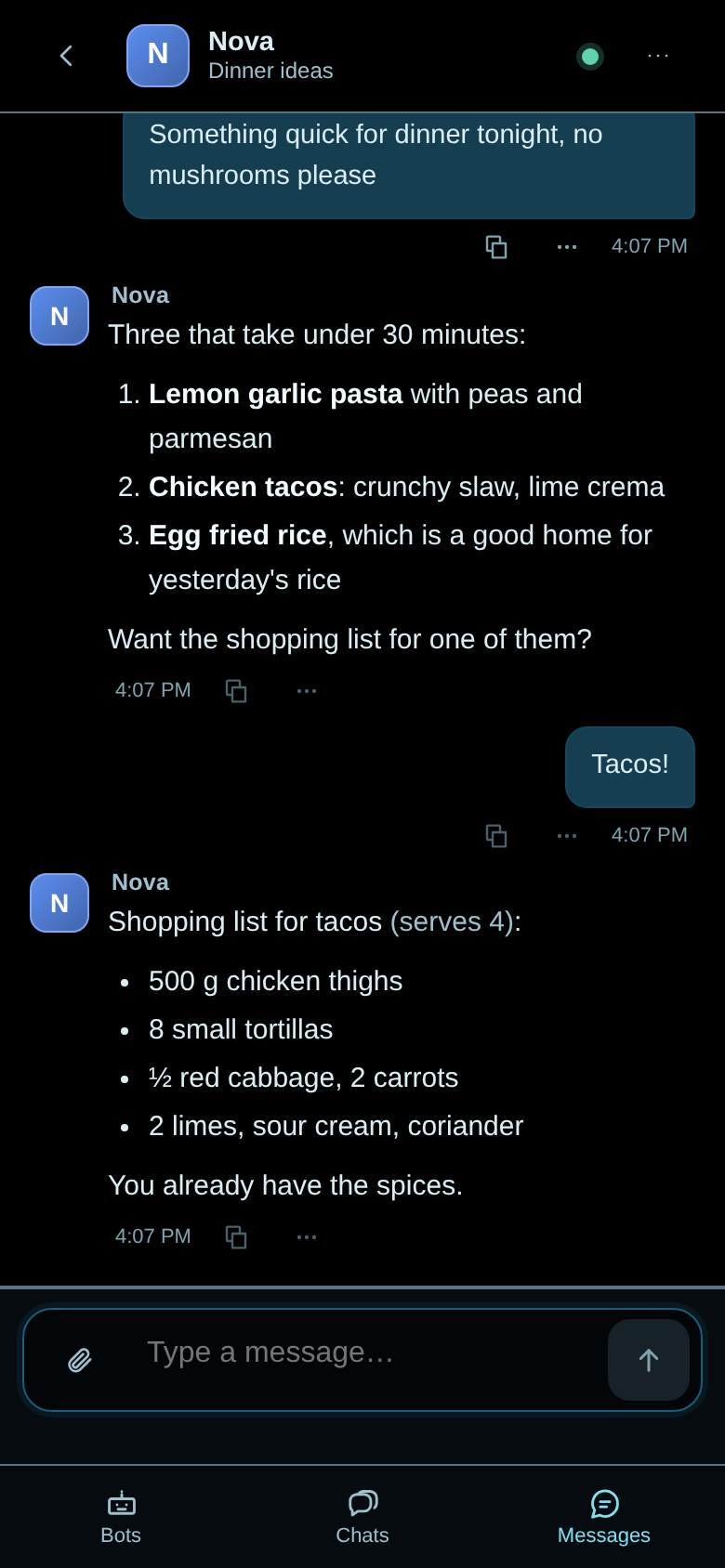
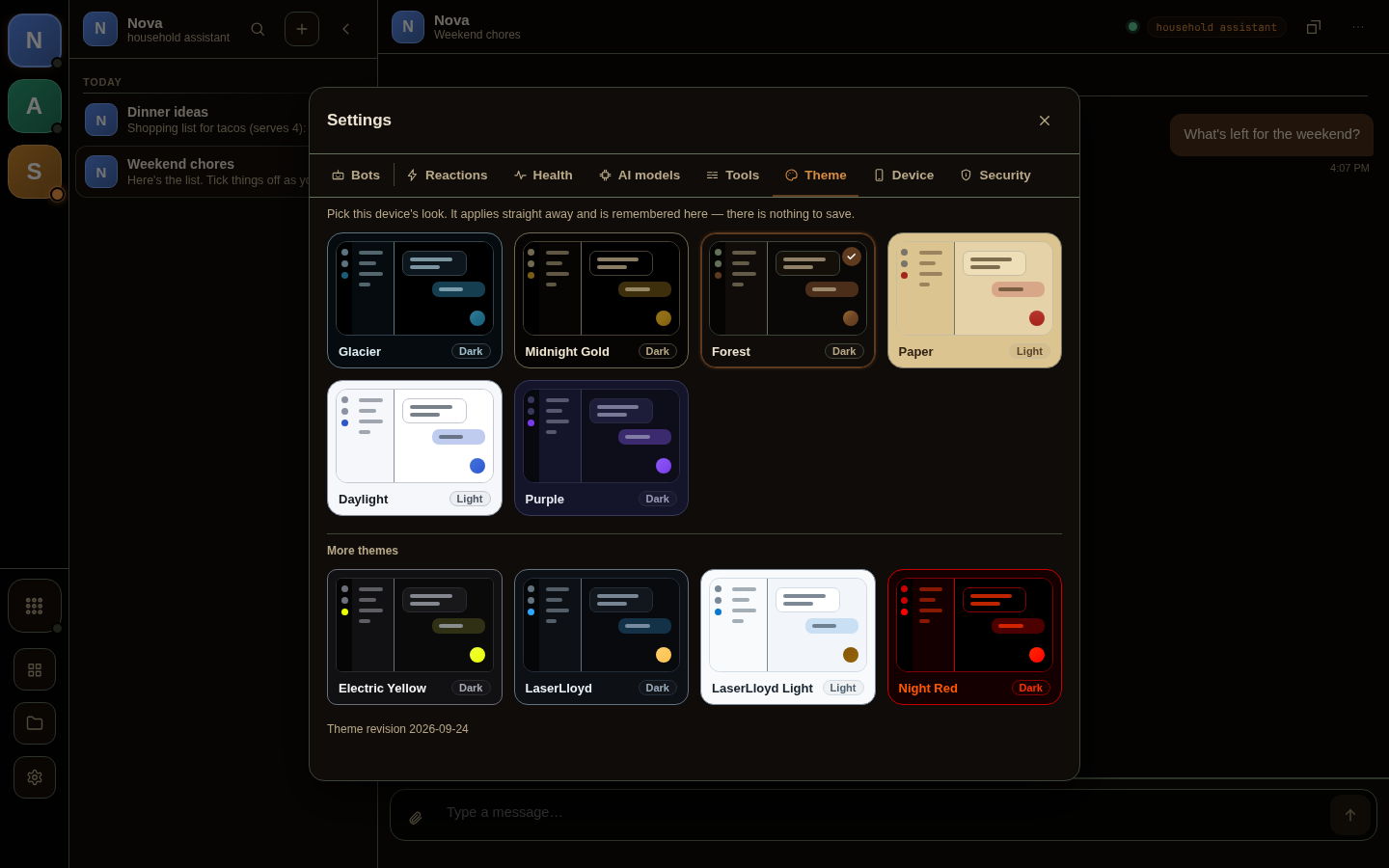
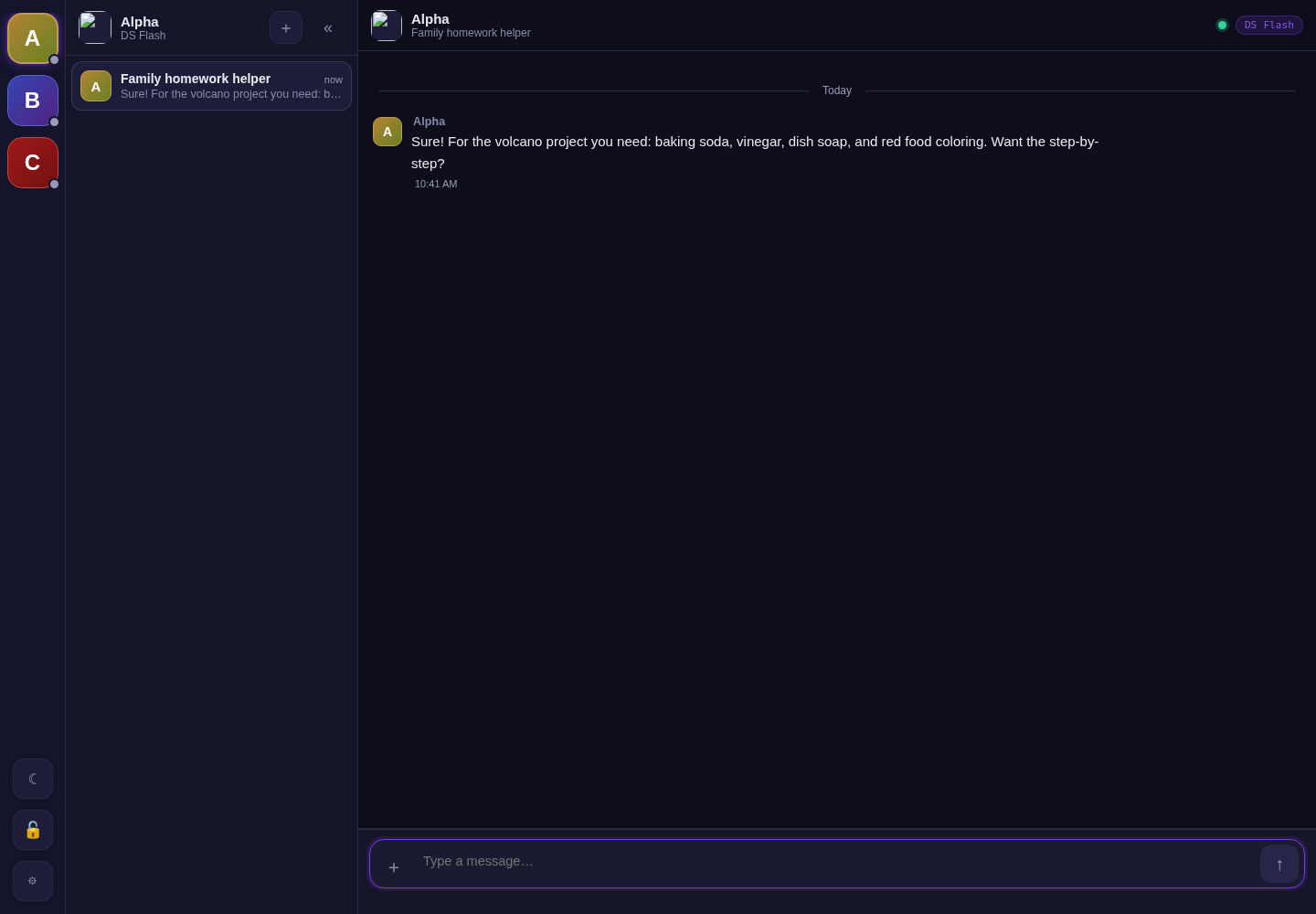
- Per-bot threads on every device. Open it on your phone mid-conversation and it is the same thread with the same history. Threads can be pinned, archived, renamed and searched.
- Streaming markdown replies with syntax-highlighted code and copy buttons, image and video previews with a lightbox, and an installable PWA.
- A live working panel and a Stop button. A status line names what the run is doing (loading the model, writing, using a tool). Click the typing dots to watch the agent's thinking and tool calls, or press Stop to abort the run.
- The usual chat-app controls. Regenerate keeps the earlier answers, you can edit a message and re-run from it, quote a reply, give thumbs up or down, or drop a message from the context. Each thread can override the model and thinking level, and a meter shows how full the context is.
- Drafts and an offline outbox. An unsent draft stays with its thread, and a message sent with no connection waits and goes when the connection is back.
- Tools and apps. One Tools button opens your own projects inside the app: a static folder, a web page, or a trusted app package with its own backend and bot. The Job Board is the first app.
- Two ways to get an AI talking. Point a bot straight at a model API (LM Studio, Ollama, OpenAI, Anthropic or anything OpenAI-compatible) from a settings panel, or connect an OpenClaw gateway for agents that use tools and act on the machine.
- A push API.
POST /api/injectlets a cron job or another agent drop a message into a thread. That is how a morning briefing reaches my phone without me asking. - Two-tier lock. A PIN separates the full-power agents from a safe subset. More on that below.
- Host dashboard. Health, storage, database integrity and backup status, plus a checklist of what is misconfigured.
- Eight interface languages, including right-to-left Arabic, and ten themes.
- A local viewer. Tap a file path in a message and the file opens inside the app, even from a phone. It serves nothing until you name a folder, and never serves secrets or system paths.
Agents can also post images into a thread. A bot writes a [[pic:prompt|caption]] marker in its reply, a placeholder appears straight away, and it turns into the picture when the render finishes. Mine come from a GPU machine elsewhere on the network. If that machine is down, the placeholder says so instead of failing silently.
The File Server
This is the piece I use most. Open DisPatch on any device, drop a file on it, and the file is on the server, grouped by day with thumbnails for images and video.
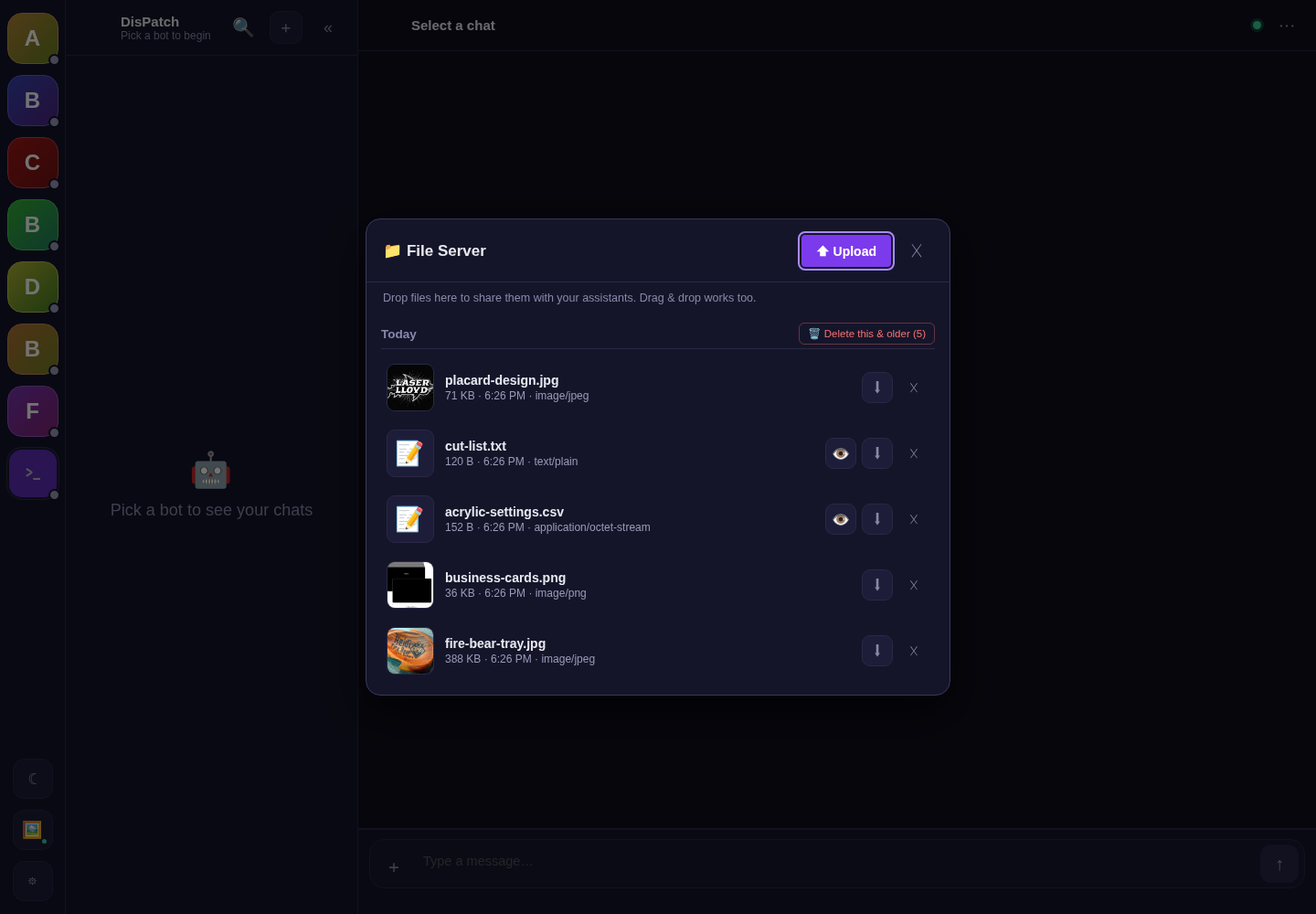
The value is where the files land: on the same machine the agents run on. A photo uploaded from my phone can be read off disk by an agent seconds later, so I can describe it, file it or put it on a website without a cloud drive or a cable.
The code guards the obvious failure modes:
- The declared upload size is checked before FastAPI buffers the body, so a phone can't exhaust the host's memory.
- Total storage is capped at 20 GB by default (
DISPATCH_FILES_TOTAL_MAX, 0 turns it off). - Each upload is written to a temporary file, synced, then renamed into place, so a dropped connection never leaves half a file.
- A locked device gets a one-way drop. It can send you a file but can't browse or download anything the File Server holds.
Why I built it instead of using an existing UI
Rocket.Chat worked, but a database and a pile of containers is a lot of infrastructure for "send text, get text back, sync it everywhere."
Open WebUI and LibreChat are the usual answers to "self-hosted AI chat," and they are good at talking to models. My needs were different. I wanted agents as participants in threads the whole house shares, a lock the server enforces for devices kids pick up, an HTTP endpoint that scripts can post into, and files that land where the agents can read them. That combination is what DisPatch is. If you only want a nice front end for a model, start with one of those.
It also has no build step. The frontend is vanilla JS modules and plain CSS/HTML, with no bundler and no npm run build. My requirement going in was "easy for an AI agent to modify later": edit a file, refresh, done. I'd make the same call again.
What's in the download
The zip is dispatch-2026-10.zip, the DisPatch 2.0.0 release, byte-for-byte the v2.0.0 tag of the public repository. I measured it for this revision:
| Item | In the zip |
|---|---|
| Download size | 2,992,647 bytes (2.9 MB); 319 files, 7.9 MB unpacked |
| SHA-256 | e9824d3c13bb3acd2d2eebcf2b162b14ae26eb86f56ca0e4ac8aa20f686a2398 |
| Backend | Python 3.12+, FastAPI + uvicorn, one SQLite file, managed with uv. 36,501 lines in backend/app/ (main.py is 12,331), plus 5,497 in the bundled Job Board app |
| Tests | 30,726 lines of Python tests; pytest reports 1,915 passed, and 473 frontend tests run under node --test |
| Frontend | No-build vanilla JS: about 21,000 lines outside the vendored libraries and tests, plus about 9,300 lines of CSS and HTML |
| Vendored libs | marked, highlight.js, DOMPurify. No CDN calls |
| Data | Outside the code, by default in ~/.local/share/local-chat/ (the project's old name): the database, config.yaml, security.yaml, media, files and rotated DB backups |
| Licence | MIT |
What changed since the August 1.0.0 zip:
- Replies take the fast path and can't get lost. Messages now go to the agent gateway over the WebSocket that's already open, instead of starting a new
openclawprocess per message. That took about a second off every reply (2.26 s to 1.12 s of fixed overhead, measured). Text streams in as the model writes it. Every run the gateway accepts is tracked until it settles, so a reply still lands after a dropped connection or a server restart. - Licence. 1.0.0 was AGPL-3.0. The project was relicensed to MIT on 2026-08-30, and 2.0.0 is MIT. The older July and August zips are still at their old addresses, and each carries its own
LICENSEfile. - The coding terminal is gone. 1.0.0 shipped an optional in-browser terminal (a server-side PTY streamed into xterm.js). I used it for a coding agent I've since retired, so 2.0 removes it along with its vendored library. The DeepSeek Harness pane, on when
dshis installed, covers that job and can now launch, watch and stop live sessions. - New: the conversation controls, drafts and outbox, tools and apps, checklist tables, the local viewer, image markers, ten themes in place of the light/dark switch, and quieter message rows. The full list is in the repo's
CHANGELOG.md.
Setting it up
This is condensed from the README.md and docs/ inside the zip. It is a normal uv project:
unzip dispatch-2026-10.zip
cd DisPatch-2.0.0/backend
uv sync --frozen
uv run pytest -q          # 1,915 passed on my machine
uv run uvicorn app.main:app --host 0.0.0.0 --port 8765
Or skip Python: cp .env.example .env && docker compose up -d from the top of the unzipped tree. deploy/systemd/ has unit files for the always-on version, and docs/deploy-bare-metal.md covers the step everyone forgets: loginctl enable-linger, or your user service dies when you close the SSH session.
- Set a PIN first (gear icon, then Security). Both commands above listen on
0.0.0.0, so until a PIN exists everyone on your network has full access. Use--host 127.0.0.1(orBIND_ADDR=127.0.0.1for Docker) while you look around, and don't forward the port to the internet. - Edit
config.yamlin the data directory so the botids match your OpenClaw agent ids. It is re-read when the file changes. - Settings come from environment variables prefixed
DISPATCH_, all listed in.env.example:HOST,PORT,DATA_DIR,AGENT_TIMEOUT(900 s),MAX_CONCURRENCY(3),GATEWAY_WS. DISPATCH_MAX_CONCURRENCYcaps how many agent runs happen at once. The default of 3 protects a machine running local models. A fourth message waits its turn; it isn't dropped.
DisPatch doesn't ship OpenClaw. For agents, it expects an OpenClaw gateway on the same host. Without one, the app still starts and logs a warning. Threads, the inject API, the file server, the PIN lock, tools and direct model APIs all still work. That's how I smoke-test the zip: fresh unzip, uv sync, spare port, no gateway.
How a reply reaches you
Most of the engineering went into the failure cases: the connection drops mid-reply, the server restarts with a run in flight, or a subagent answers ten minutes late. Transport is chosen by DISPATCH_GATEWAY_WS. Unset means each message starts an openclaw agent process, which hands back the reply when it exits. shadow connects and logs what it would deliver without delivering it. 1 means messages go over the gateway socket and replies stream back on it. I run 1. The zip ships with it off, so nothing changes how replies arrive until you switch it on.
With the socket on, every run the gateway accepts goes into an in-flight table and is settled with the gateway's own "wait for this run" call. If the live stream is cut, the reply still lands when the run finishes, and runs that were in flight when the server went down are recovered at startup. Only a run the gateway never accepted is retried, so nothing is sent twice.
One caveat about the backstop. The transcript sweep reads OpenClaw's session files, and newer OpenClaw releases keep sessions in a database instead. On those, DisPatch logs at startup that the file-based backstops can't run, and the socket is the delivery path. That's one more reason to turn the socket on.
Whichever path gets there first, every candidate reply goes through one funnel that checks whether it has already been delivered, so a reply found twice still shows once. Even on a CLI error, the sweep runs before giving up, because the model has often written its answer to the transcript before the process died.
The two-tier lock: normal vs. Safe Mode
The unlocked side isn't a toy. Those agents can edit code, push changes to my live website, run tools and manage the machine they live on. The locked side is general chat only. It's still useful for questions and help, but it can't reach any of that. The family phone isn't always in adult hands, so the server enforces the lock. Here is what happens to a request:
Remembering devices is off until you turn it on in Security settings, which sets the window to 30 days. Pressing Lock on a remembered device forgets that device, and changing the PIN forgets all of them. The server keeps at most 10 remembered devices. If the trusted-device file is corrupt, no device is trusted and the PIN still works.
If you lock yourself out, there are two ways back in: a recovery-code file, or editing the security.yaml file directly. If security.yaml is damaged, the app stays locked instead of serving everything to anyone on the LAN. That was a deliberate call.
Gotchas
- The inject API field is
content.POST /api/injectwants{"bot_id": "...", "content": "..."}. Sendingtextwas the most common integration mistake, including mine. - Don't pass long messages as a CLI argument (this still matters on the fallback path). Linux caps a single argument at 128 KB (
MAX_ARG_STRLEN), and a long message fails the spawn with E2BIG. The code writes the message to a temp file and passes--message-file. Don't "simplify" that back to an argument. - Session keys are lowercase, bot ids aren't. OpenClaw lowercases session keys, but your ids can be mixed-case (
Alpha,My_Bot). With a case-sensitive lookup, the working panel and late-answer delivery quietly stop while everything else works. The fix is exact match first, lowercase as the fallback. - The CLI only returns the final block. Without the socket, anything an agent says between tool calls exists only in its transcript. That's why the transcript sweep exists, and why it still runs as a backstop when the socket is on.
- Check Origin on WebSockets. HTTP middleware doesn't run for WebSocket routes. DisPatch authenticates inline and rejects a handshake whose
Originhost doesn't matchHost, which blocks cross-site WebSocket hijacking. Non-browser clients send no Origin and pass. - Never serve uploaded SVG as an image. An SVG opened directly can run script in your origin, which makes it a stored-XSS hole. DisPatch refuses SVG as media and sends media with a sandboxing CSP and
nosniff. - Service-worker updates strand old tabs on old JS. It looks exactly like a regression. The fix is an automatic reload on
controllerchange.
Replicating the idea
Even if you never run my zip, the architecture is four replaceable pieces:
- A chat backend that owns the history: one small web server (here FastAPI and one SQLite file in WAL mode), a WebSocket for live updates, and a plain HTTP endpoint for pushing messages in. That replaces the database and the pile of containers.
- An agent gateway the backend talks to: here OpenClaw, but anything that takes a session id and a message and returns text will do. As a separate process, it can crash, upgrade or be swapped without taking the chat app down.
- Model servers behind the gateway (LM Studio, vLLM, Ollama). They're the gateway's problem, not the chat app's.
- Optional media services, like an image generator on another machine, that agents call as tools. The backend just stores what comes back.
These lessons apply whatever your stack is:
- Enforce the locked mode on the server, never in CSS.
- Treat "the reply reached the user exactly once" as a delivery problem you design for, with deduplication.
- Keep the frontend build-free if AI agents will maintain it.
Related: my local AI agent stack on OpenClaw · DeepSeek Harness first look · managing my websites with a local AI agent box · set up your LLM assistant
Downloads
Free for personal use. If it saves you an afternoon, the coffee button's nearby.