OpenClaw Model Manager: Stop Hand-Editing Model Routing JSON
- Category
- Tools & Downloads
- Posted
- July 11, 2026
- Updated
- September 16, 2026
- By
- Jacob Lloyd — written with AI assistance, post-project
- Read time
- 11 min read
In plain terms: A free desktop app that gives my home AI setup a proper control panel, replacing risky hand-editing of a settings file. It shows which AI "brain" each helper is using and lets me switch them with a click, refusing to save anything that would break the system. It exists because one typo once silently knocked an assistant offline.
I once typo'd a model id in a JSON file and the agent using it just went quiet. No error, no crash. It sat there talking to a model that didn't exist while I hunted for a much more interesting bug. This app is my never-again.
TL;DR
- What it is: a GTK4/libadwaita desktop app that edits
openclaw.json, the config deciding which LLM every agent, subagent, and cron job in my OpenClaw stack talks to. - What it costs: free, MIT licensed, source in the zip below.
- What you need: Linux with GTK4 + libadwaita + PyGObject (one package-manager line), Python 3.11+, and an OpenClaw install, or the bundled example config to start from scratch.
- What you end up with: a one-screen dashboard of every agent's model, saves that can't corrupt the file or assign a dead model, and a point-and-click switch that routes the Claude Code CLI to a free local model, cheap DeepSeek, or real Anthropic billing.
Who this is for
You'll get the most out of this if you run OpenClaw with more than a couple of agents and a mix of local and paid models, and you change who runs on what more than once a month. If you set one model and never touch it again, hand-editing is fine and you don't need this.
It also covers two worse failures. A half-written or malformed openclaw.json can crash-loop the whole gateway, and the atomic write with backups rules that out. And a hand-written systemd override can leak an API key into ps output, which the Coding Helper switcher avoids by construction.
What changed in the 2026-08 build:
- An Add API Model dialog adds a cloud provider in one edit. It writes the provider block and the catalog entry together, and the key goes into the gateway's environment file, not the config.
- Context windows are editable on catalog rows.
- Catalog rows show what the provider actually advertises for each model.
- The inference server on my second PC is now llama.cpp-based rather than LM Studio, on the same port. The app needed no change, because it reads provider base URLs from the config instead of hardcoding them.
What you end up with
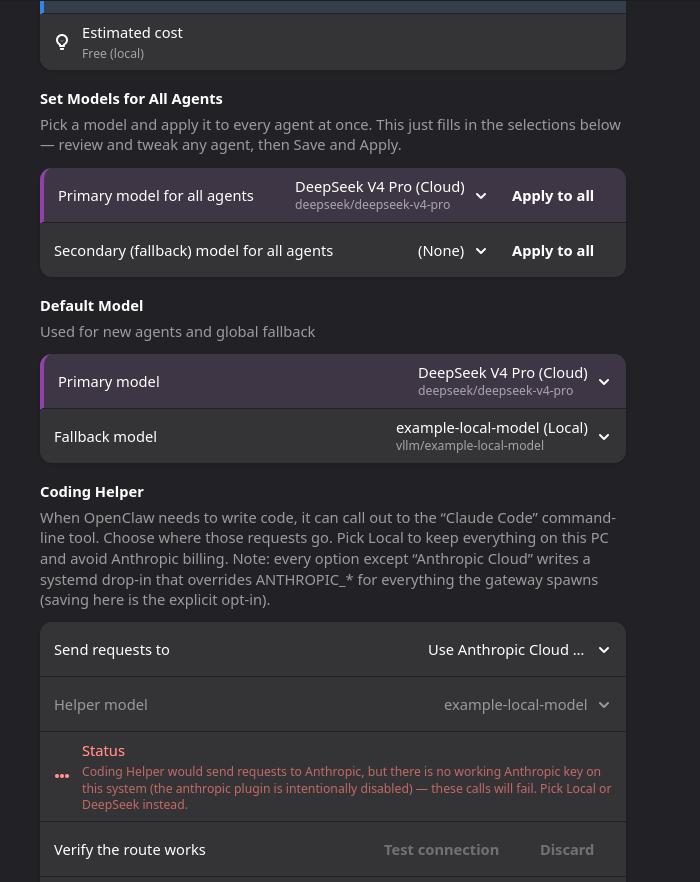
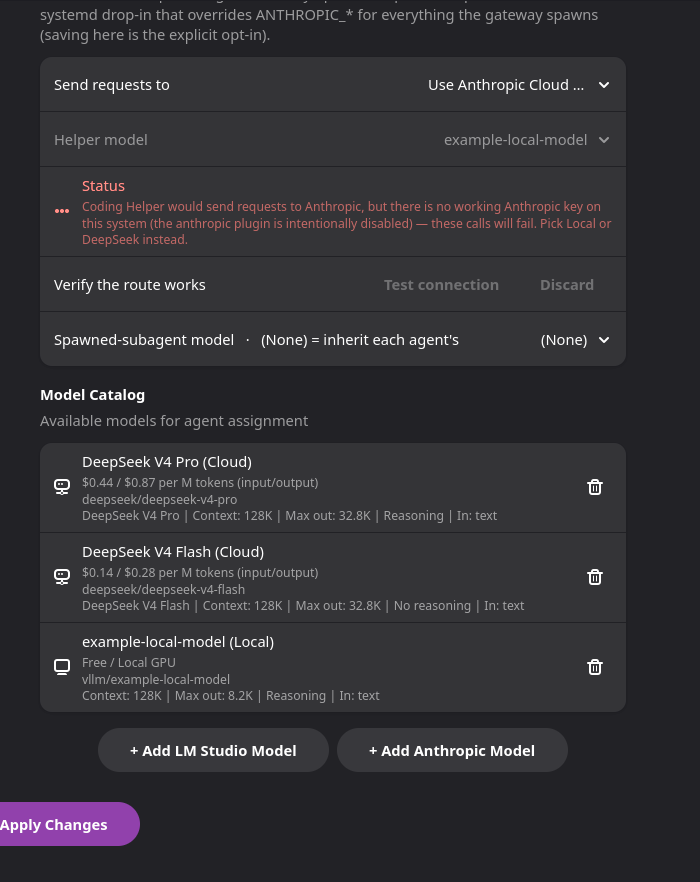
Screenshots first. These come from a sandboxed copy running against a dummy config in a throwaway HOME. Real app, fake data, none of my keys.
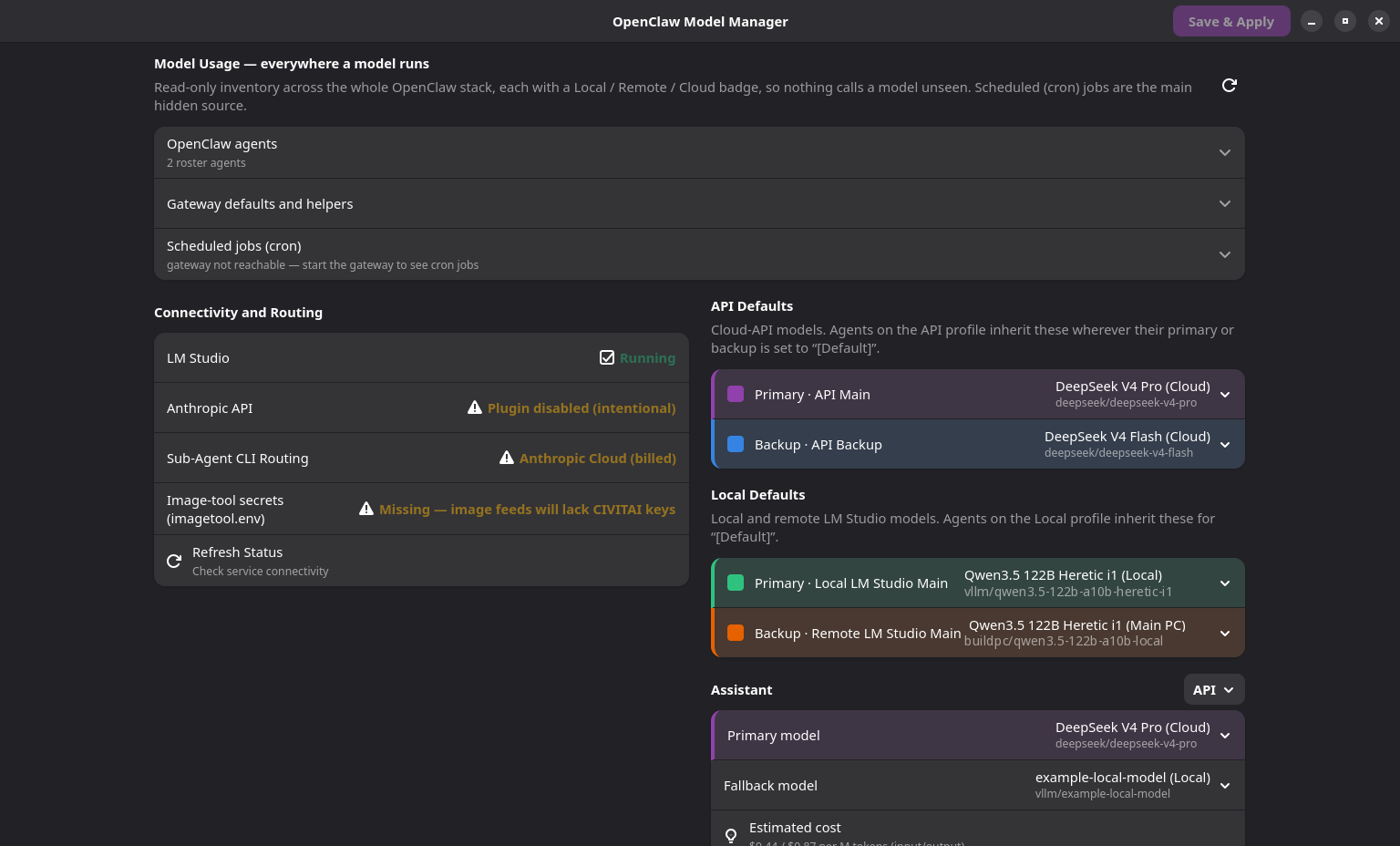
The main window answers the question I used to answer by grepping JSON: which model is running where, and what does it cost? Every agent, the stack-wide defaults, the subagent override, cron jobs, even a sibling email agent's models. Each entry gets a color badge: Local (this PC), Remote (the second PC), or Cloud (the one that shows up on a bill). Local and Remote are both just OpenAI-compatible servers as far as the app is concerned, and all it cares about is what each one answers on /v1/models. When I took these screenshots, this PC ran LM Studio. It runs no models now; the second PC runs a llama.cpp-based server.
Why this exists
OpenClaw is the multi-agent stack I run at home: several AI agents, each pointed at a model, some local and free, some cloud and billed. All the routing lives in one file, ~/.openclaw/openclaw.json: model catalog, per-agent primary/fallback assignments, provider configs, and the gateway's own auth token. Hand-editing it kept going wrong in two ways.
First, edits break things, and a malformed save is the worst of it: one bad edit and the whole gateway crash-loops (the failure mode I cover in what I do when the gateway breaks).
Second, rerouting coding work was invisible env-var surgery. If your gateway hands coding tasks to the Claude Code CLI, the ANTHROPIC_* environment variables on the gateway's systemd unit decide where those requests go and who gets billed. Switching between free local, cheap DeepSeek and real Anthropic meant hand-writing a systemd drop-in each time, which is exactly the kind of thing I get wrong at 11pm. The app's Coding Helper panel does that for you. I've since stopped routing Claude Code through my own gateway, so the drop-in hasn't been installed on my box since September 2026, but the switcher still ships in the download and works as described below.
The save path
The part I need to trust is what happens when you click Save. This is it, in order:
Two steps carry the weight. The model pickers only offer ids the config knows, and a stale default that names a missing model is refused (example below), so the dead-model bug from the intro is something the app blocks instead of something I have to remember to check. And the atomic write exists because openclaw.json holds the gateway's auth token and must stay chmod 600: the temp file gets the original's permissions before any content is written, then it's fsync'd and renamed over the original. Crash mid-save and the old file is untouched.
A bad save is one rename away from undone. After rotation you have six copies on disk: the newest in .bak and five older ones in .bak.1 to .bak.5. Each save pushes the oldest one out.
Here is what the dead-model guard looks like in practice. The model dropdowns only list ids the config already knows, so the usual way a dead id sneaks in is a "[Default]" slot that still names a model the provider has since dropped. The app keeps the agent's current model and shows this message instead of saving the ghost (agent and model names here are placeholders):
"[Default]" primary for worker points at vllm/old-model, which doesn't exist on its provider — keeping the agent's current model. Fix the Model Defaults slot.And this is the whole diff of one real save, switching the example config's worker agent to DeepSeek flash. I ran the app's own save code against a copy of the bundled example in a throwaway home directory:
--- openclaw.json.bak
+++ openclaw.json
@@ -36,7 +36,7 @@
         "id": "worker",
         "name": "Worker",
-        "model": "vllm/example-local-model"
+        "model": "deepseek/deepseek-v4-flash"
       }
One thing to expect: the first save rewrites the whole file with two-space indentation, so arrays you wrote on one line, like "input": ["text"], get spread over several lines. The data is identical. After that first save, diffs stay this small.
The Coding Helper drop-in
This is an optional feature for setups where the gateway spawns the Claude Code CLI. Rerouting it is a separate flow because it never touches openclaw.json. The app writes a systemd drop-in that overrides the gateway's environment before the gateway spawns any Claude Code process.
Four modes, one dropdown: LM Studio (free, local), DeepSeek via its Anthropic-compatible endpoint (cheap), Anthropic Cloud (the default: no drop-in at all, nothing overridden), or Off (the dropdown says "Turn off"), which points the CLI at http://127.0.0.1:9/blocked so every call fails fast instead of hanging. There's also a one-click live test that fires a real Anthropic-shaped ping at LM Studio or DeepSeek and reports which model actually answered. That tells you more than any config screen can, because the request really happened.
Keeping the API key out of the unit file
DeepSeek mode needs an API key, and a systemd unit file is a lousy place for one: anything written there directly sits in plain text on disk and in systemctl show output. So the drop-in never contains the key. It writes this instead:
ExecStart=/usr/bin/bash -c 'export ANTHROPIC_API_KEY="$$DEEPSEEK_API_KEY"; exec <gateway cmd>'The trick is $$. In a unit file, $$ escapes a literal $. Without it, systemd expands the variable itself while building the command line, and the real key lands in the process's argv where ps can read it. With the double dollar, bash receives a literal $DEEPSEEK_API_KEY and expands it at runtime from the gateway's EnvironmentFile (gateway.systemd.env in the OpenClaw home directory, chmod 600). The secret never appears in the unit file, in systemctl show, or in a process listing. It exists only inside bash's own environment, for that one process. The zip's examples/ folder documents the pattern with CHANGE_ME placeholders.
The Add API Model dialog from the 2026-08 build applies the same rule from the other direction. Adding a cloud provider by hand means editing two places in openclaw.json that have to agree: a models.providers.<id> connection block and an agents.defaults.models catalog entry. Miss either half and the model isn't selectable anywhere, with no error to tell you why.
The dialog writes both in one edit. The key you type goes into that same gateway.systemd.env file. The file is backed up first, keeps its 0600 mode, and has any duplicate definition of the variable collapsed so a stale later line can't win. openclaw.json gets only the string "${YOUR_KEY_VAR}". Before you save, a Test button sends one real request to the endpoint. That's the only way to prove the base URL, protocol, key and model id all line up, instead of finding out weeks later that a provider was dead the whole time.
Setup
From the README shipped in the zip:
# 1. Install GTK4 + libadwaita + PyGObject from your distro's packages
#    (one dnf/apt line; README-SETUP.md has the exact package names)

# 2. Install the app and its launcher
install -Dm755 openclaw-model-manager ~/.local/bin/openclaw-model-manager
# .desktop file goes to ~/.local/share/applications/

# 3. If you don't already have an OpenClaw config:
cp examples/openclaw.json.example ~/.openclaw/openclaw.json
chmod 600 ~/.openclaw/openclaw.json
# then replace every CHANGE_ME placeholder inside it

# 4. Optional: API keys go in two files in the same directory as
#    openclaw.json: .env and gateway.systemd.env (both chmod 600;
#    examples/ has a template for each)
No pip installs beyond PyGObject; everything else is Python 3.11+ stdlib, tomllib included. The whole thing is one executable script (4,181 lines, about 190 KB), a .desktop launcher, a README, an MIT license, and four example configs. The zip is 56 KB.
Gotchas
- Cloud mode only means "no drop-in." Nothing gets overridden, so whatever was already configured on the unit keeps running. The app warns when the mode you picked has no working key, but check anyway.
- The drop-in shadows your real Anthropic key, by design. Local mode sets
ANTHROPIC_API_KEY=lm-studiofor everything the gateway spawns. On my machine that silently rerouted my interactiveclaudeCLI aliases to LM Studio. Claude Code kept "working," but the answers came from a local model. If Claude starts sounding off, runsystemctl --user cat openclaw-gateway.serviceand look for a drop-in before blaming the model. - After
openclaw updatechanges the gateway's ExecStart, re-select DeepSeek mode once to re-wrap the new command. The app reads the canonical ExecStart from the unit fragment and detects its own wrapper (it keys onindex.jsplus the absence of$$DEEPSEEK_API_KEY), so it never double-wraps. It won't auto-fix a command it hasn't been told to look at again. reasoning: trueis the safe default for local models. A model that emitsreasoning_contentwhile configuredreasoning: falsereads as stalled to the gateway: about 390 seconds of silence, then a kill. It's harmless left on for non-thinking models, so the add-model dialog defaults it on. This one cost real debugging time.- A non-empty
plugins.allowis a strict allowlist.enabled: trueon a plugin entry does nothing unless its id is also inallow. The app reads this correctly and deliberately never writesplugins.*at all, so if a plugin misbehaves, this isn't the tool that'll tell you why. The agent stack write-up covers the same trap. - The gateway rewrites
openclaw.jsonon its own (identity reconcile,openclaw update). The app tracks the file's mtime and warns before overriding an external edit, and the pre-save backup keeps whatever was actually on disk. - An advertised context window is only what the server claims. A server will happily tell you a model has a 500,000-token window when the engine actually loaded behind it can serve a fraction of that, and the gateway believes the advertisement, so long prompts fail in a way that looks like the model's fault. That's why catalog rows let you edit
contextWindowdown to the truth. - Model ids are
provider/raw-id. A bare id with no slash resolves through the local inference endpoint. Some servers use a longer raw id (publisher/repo/file-stem), so paste whatever the provider advertises rather than shortening it. It's a naming convention rather than an error, and it's worth knowing before you go hunting for a provider field that isn't there.
Related: the agent stack this app edits the config for, putting DeepSeek behind everything, and what I do when the gateway breaks.
Downloads
Free for personal use. If it saves you an afternoon, the coffee button's nearby.