StudioForge 2.0: Accounts, Scoped API Keys and a Safe Upgrade Path
- Category
- AI & Local LLM
- Posted
- October 19, 2026
- By
- Jacob Lloyd — written with AI assistance, post-project
- Read time
- 16 min read
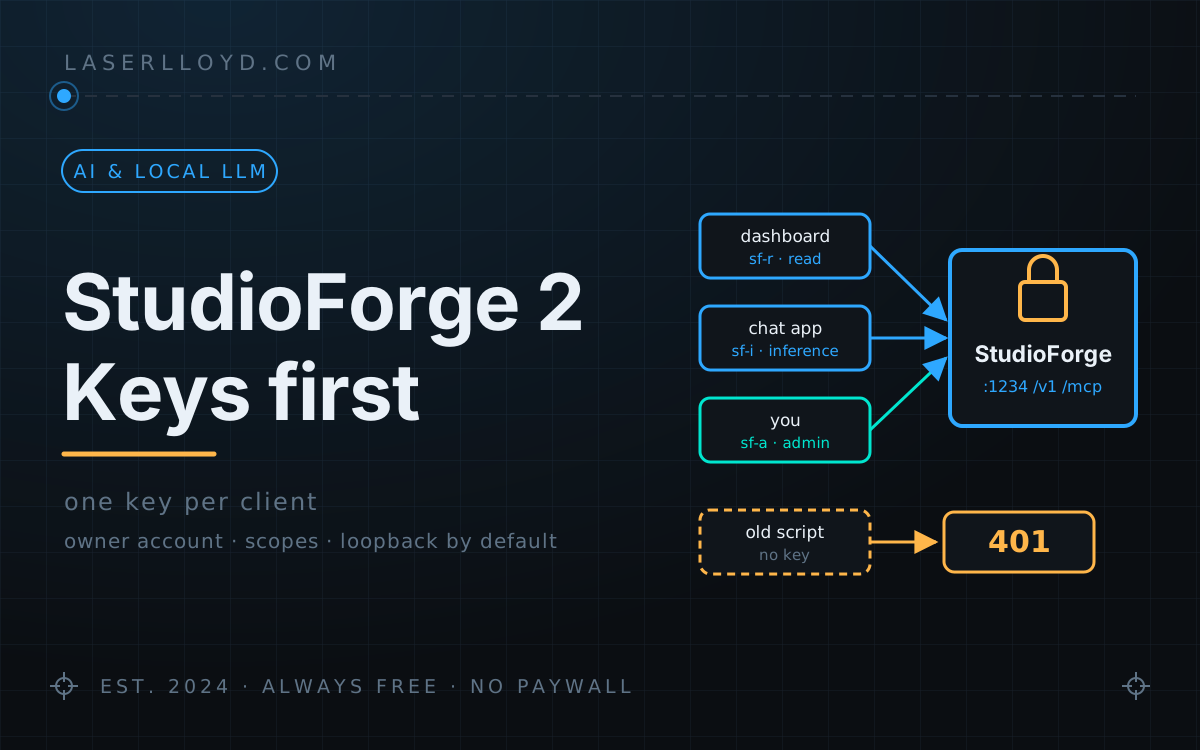
In plain terms: StudioForge is the program that runs AI models on the graphics cards in my rig and answers apps that ask for them. Version 2.0 adds a lock to the door. Out of the box only the computer it runs on can reach it. If you open it to your network, you first create an owner account, and every app that talks to it gets its own key with only the rights it needs. If you upgrade a server other machines already use, those apps stop working until each one has a key. This page shows how to do that in about ten minutes.
StudioForge is the GPU-only model server I wrote to replace LM Studio on my rig (the full story is in the original write-up). Version 2.0 changes who can talk to it. In 0.2.0 it listened on every network interface and trusted anything that could reach it, with an optional PIN for the agent tools. In 2.0 it listens on the machine it runs on and nowhere else until you say otherwise, and once you open it up, every caller needs a key.
I upgraded my own rig on 2026-10-19. Every program that called it without a key started getting 401 within minutes: my mail tool, my chat app, the agent gateway's memory search, a handful of scripts. None of them were broken. They just had no key yet. This page is what I wish I had read first.
tl;dr
- Version: 2.0.1 (
main, commit34f4b03). There is no tagged GitHub release or published container image yet, so you install from the repository. - If StudioForge only serves the machine it runs on, nothing changes for you. No account, no keys, no prompts.
- If other machines use it, it now refuses to start until an owner account or an admin key exists. After that, any caller without a key gets
401. - The fix: one key per client, each with the weakest scope that works (
read,inferenceoradmin), then retire the old shared key and the PIN.
What changes for you
Three things, in plain terms.
- It is private by default. The gateway (port 1234), the control panel (8080) and the recovery watchdog (1235) bind
127.0.0.1. Other machines cannot reach them at all. - Opening it up needs a login. If any of the three listens on a network address and there is no owner account and no admin key,
studioforge servestops with exit code 4 and tells you how to fix it. You cannot accidentally run an open server any more. - Every program gets its own key. A key is a string like
sf-i-…that a program sends asAuthorization: Bearer <key>. Each key has a name, a scope, an optional expiry and an optional requests-per-minute limit, and you can revoke one without touching the others.
Here is the refusal, from my scratch test with all three hosts set to 0.0.0.0 and no account:
error: Refusing to start: the gateway, the control panel, the watchdog would listen on a
non-loopback address (0.0.0.0, 0.0.0.0, 0.0.0.0) but no owner account or admin API key exists,
so anyone on the network could drive this server. Fix: run `studioforge setup` (creates the
owner account) or `studioforge keys create --name admin --scope admin`, then start again.
One detail caught me out: creating the first key turns authentication on for everyone, including programs on the same machine. I made one key on a loopback-only test server, and a plain curl to /v1/models from the same box went from 200 to 401 a moment later. The StudioForge CLI, tray and panel keep working because they create their own local admin key (local-cli, stored owner-only in the data directory). Everything else needs a key from then on.
The ten-minute safe upgrade
This is the order that keeps the outage short. It follows the CHANGELOG's migration steps, with two corrections from my own run.
- List your clients. Every chat app, agent, script and other machine that calls the server. Grep their configs for the server's address if you are not sure. This list is the whole job.
- Back up and preview. Copy the data directory, update the code (
git pull, then reinstall into your venv the way the README describes for your platform), and runstudioforge migrate --dry-run. 2.0.1 moves the database to schema 10 andstudioforge migratebacks it up before applying. - Create the credential that lets it start. Either
studioforge setup(the guided first run; it creates the owner account and, if you choose "my local network", turns on HTTPS and makes an admin key), or juststudioforge keys create --name admin --scope admin. - Create one key per client, all at once, before you start the new server:
Each token is printed once and never stored, so paste it into that client's config straight away.studioforge keys create --name chat-app --scope inference --rate-limit-rpm 120 studioforge keys create --name dashboard --scope read studioforge keys create --name laptop --scope admin --expires-in-days 30 - Start the server and test each client with one real request. A
401 invalid_api_keymeans that client still has no key; a403 permission_deniedmeans its key's scope is too weak for what it tried. - Retire the old credentials last. Once every client works on its own key:
studioforge keys revoke legacy, clearserver.api_key, and switch off the MCP PIN. See the PIN gotcha below; clearing the PIN alone does not work. - Run
studioforge doctorand read what is left.
If you already used server.api_key, the upgrade itself breaks nothing: the old key is mirrored into the key table as an admin key named legacy and keeps working. My rig had no shared key, only the PIN, so every client fell over at once. Doing step 4 before step 5 would have saved me most of that.
The panel: sign in, set up, make keys
These screenshots come from a throwaway 2.0.1 instance I ran in Podman on a machine with no NVIDIA GPU (more on that below), so the two cards are simulated and the keys are worthless.
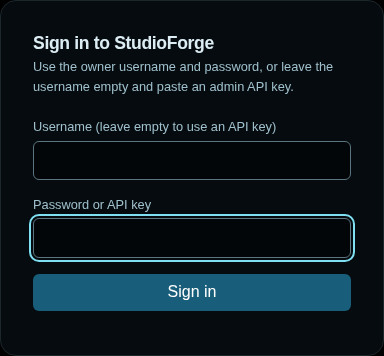
The panel now has a sign-in page. Use the owner username and password, or leave the username empty and paste an admin key. A read or inference key cannot open it.
The setup guide at /setup walks through eight steps: owner account, hardware, engine, model libraries, a starter model, a test chat, client snippets, and who can reach the server. Every step can be skipped. The last one is where you choose between "only this computer" and "my local network, over HTTPS".

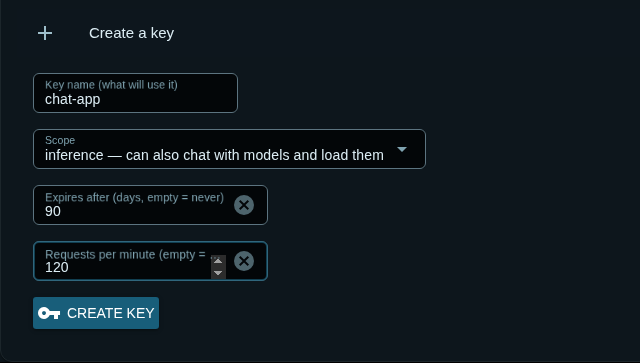
Keys live under Users & Keys. Give it a name that says which program will use it, pick a scope, and optionally an expiry and a rate limit.
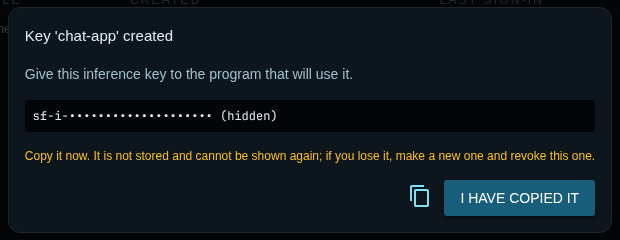
The token is shown once. I hid it in this screenshot, but on a real server this dialog is the only time you will see it.
The table shows each key's scope, the first few characters, last use, expiry, rate limit and state. Below it is the audit log: every key created or revoked, every sign-in and every admin change, with the actor and where it came from. Secrets never go into it.

local-cli is the one StudioForge makes for its own CLI and tray.Scopes: read, inference, admin
| Scope | Can | Give it to |
|---|---|---|
read | Look: status, model lists, /metrics, read-only MCP tools. Cannot POST anything. | Dashboards, monitoring |
inference | Read, plus chat (/v1/chat/completions, /v1/messages, /v1/responses), load, unload and test models, and take or release its own GPU lease. | Chat apps, agents, scripts, other GPU programs |
admin | Change the box: settings, restarts, engine installs, updates, downloads, deletes, pins, keys, accounts, the audit log, support bundles, destructive MCP tools. | You |
The rule is code, not convention (api/auth.py:required_scope). It matches by path prefix, and any state-changing route nobody classified needs admin, so new routes are covered by default. A scope is enforced whenever a key is sent, even on a server that needs none: a read key cannot POST on a loopback-only box either. I checked the edges on the scratch instance: an inference key got 200 on /v1/models and 403 on /api/keys.
Agents get a key too, never the owner password. The panel's Integrations page prints ready-to-paste blocks for OpenClaw, the OpenAI and Anthropic Python SDKs, DisPatch, curl and Claude's --mcp-config file. Pick a key in its drop-down first: with the placeholder selected, the curl block leaves out the Authorization header, so pasted as-is it gets a 401.
The owner account, the old shared key and the PIN
2.0 has three kinds of credential, and two of them are on their way out.
- The owner account signs in to the panel. The password must be at least 10 characters and is hashed with argon2id. The hash goes to the OS keyring if the optional
keyringextra is installed, otherwise to an owner-only file. It is not in the database, so a copied database carries no login. server.api_key(deprecated) still works everywhere as an admin credential, shows up as the keylegacy, andkeys revoke legacyreally disables it.mcp.pin(deprecated) is an eight-digit admin credential for the MCP endpoints only. On a server with no keys it still opens the box-changing HTTP routes to remote callers, so old pairings keep working. Once any scoped key exists it stops doing that.
The PIN gotcha. The CHANGELOG says to "clear server.api_key and mcp.pin". If you set mcp.pin: null and nothing else, the next start mints a new random PIN and writes it back, because mcp.pin_required is still true. I watched it happen. To really retire it, set both:
mcp:
  pin: null
  pin_required: false
The same logic means a brand-new 2.0.1 install generates a PIN on first start, and studioforge doctor then reports it as deprecated. Harmless, but don't be surprised by it.
Binding, HTTPS and browsers
- Bind rule.
server.host,gui.hostandwatchdog.hostdefault to127.0.0.1. A config written by an older version names0.0.0.0explicitly, so the new default does not change it: that config stops at the refusal above until you add a credential. - HTTPS.
server.tls.modeis one switch for all three listeners:off,self_signed(a certificate generated into the data directory, with its SHA-256 fingerprint shown in the panel so clients can pin it) orcert(your own files). With a network bind and TLS off,doctorwarns that keys cross the network in the clear. A reverse proxy ortailscale servein front works too. - Browsers.
server.cors_originsnow defaults to empty (it was["*"]). Non-browser clients do not care. The MCP endpoints add their own Origin check on top: a request that carries anOriginheader must come from a loopback page or a listed origin, and a saved*does not count. That is what stops a random web page from driving your rig's management tools through your browser. - Brute force. Wrong credentials get three free tries per client address, then a doubling wait up to five minutes, separately for the API, the panel and the watchdog.
Sharing the cards: leases and tenants
If something else on the box uses the GPUs (an image generator, a speech server, a benchmark), it can take a lease on a card first, and StudioForge will not load a model onto that card until the lease is released or sits idle past its timeout. 2.0 adds a tenant registry, so those programs can announce themselves and show up with live health on the Placement page, and devices: "auto", which lets a tenant ask for any one card with enough free memory instead of naming one. StudioForge shows tenants and can ask one to warm up or to vacate a card, but it never starts or stops them.
The 2.0.1 fix matters if you run any of these: in 2.0.0 the tenant routes needed an admin key, so a speech or image server holding a sensible inference key got 403 when it tried to take a lease. In 2.0.1 they are inference routes, and each lease is tied to the key that took it: another inference key cannot release it (I tried, and got 403 permission_denied with "lease … was not created by this API key"), while an admin key still can.

One thing to know when you name a tenant: leases are matched to tenants by family, which is the holder name up to the first -. A tenant registered as speech-demo did not see its own speech-demo lease (the lease's family is speech); registered as speech, it did. Use a tenant name without a hyphen. The protocol itself is documented in the repo's docs/TENANTS.md.
sfctl 2.0.1, the remote control
sfctl is the small client for driving a StudioForge server from another machine, and the MCP bridge for agents. It needs a key now. It is not on PyPI (its README's uv tool install studioforge-companion fails), so install it from a clone:
git clone https://github.com/LaserLloyd/StudioForge.git
uv tool install ./StudioForge/packages/studioforge-companion
sfctl servers add rig http://192.0.2.10:1234 --api-key sf-i-your-key --use
sfctl status
The profile goes to ~/.config/studioforge/companion.toml, written owner-only because it holds the key. SF_API_KEY works as an environment variable instead. If the gateway is not on port 1234, add --watchdog-url, because the watchdog address is derived from the gateway's. From my scratch instance, with an inference key:
$ sfctl status
┏━━━━━┳━━━━━━━━━━━━━━━━━━━━━━━━━━━━━━━━┳━━━━━━━━━━┳━━━━━━┳━━━━━━━━━━┓
┃ GPU ┃ Name                           ┃ Total    ┃ Used ┃ Free     ┃
┡━━━━━╇━━━━━━━━━━━━━━━━━━━━━━━━━━━━━━━━╇━━━━━━━━━━╇━━━━━━╇━━━━━━━━━━┩
│ 0   │ Demo GPU 0 (simulated) (sm_86) │ 24.0 GiB │ 0 B  │ 24.0 GiB │
│ 1   │ Demo GPU 1 (simulated) (sm_86) │ 24.0 GiB │ 0 B  │ 24.0 GiB │
└─────┴────────────────────────────────┴──────────┴──────┴──────────┘
no models loaded

$ sfctl leases add --devices 1 --holder image-render --reason "a render job outside StudioForge"
lease 933d9554c0c6 holds GPU 1 for image-render
release it with: sfctl leases release 933d9554c0c6
(I trimmed the Util and Temp columns and the server table to fit.)
Doctor and the support bundle
studioforge doctor checks ports, GPUs, the engine, disk, file permissions, the certificate, migrations and the auth posture, and prints a fix for each problem. --strict exits non-zero on warnings too, which suits monitoring. This is the demo container, listening on the network with an owner account and TLS off:
[ok  ] GPU: 2 GPU(s) via fake: Demo GPU 0 (simulated) (24 GiB), Demo GPU 1 (simulated) (24 GiB).
[WARN] Engine: No llama.cpp engine is installed.
        fix: Run `studioforge setup` or `studioforge engine --update` to install and smoke-test one.
[ok  ] Permissions: The data directory is writable and credential files are owner-only.
[ok  ] Migrations: The database is at schema 10 (current).
[info] Authentication: The server listens on the network and requires an API key or an account.
[WARN] Authentication: The network listeners use plain HTTP, so keys and passwords cross the network in the clear.
        fix: Set server.tls.mode to self_signed (or cert), or front the server with a TLS reverse proxy / `tailscale serve`.
[info] Authentication: mcp.pin is set. It is deprecated and grants admin on the MCP endpoints.

9 ok, 3 info, 2 warnings, 0 failures.
On the loopback test server that still had server.api_key set, the same command warned "server.api_key is set. It still works (as the admin key 'legacy') but is deprecated", with the fix: create scoped keys, move the clients, revoke legacy.
studioforge support-bundle writes a small zip for bug reports: a redacted config, the doctor output, versions, the GPU list and log tails. Mine was 6 KiB with the PIN shown as [REDACTED]. It also redacted engine.pinned_tag, the llama.cpp build number, which is useful in a bug report and not a secret, so add that by hand. The command itself says "look before you share", and it is right.
Running it in a container
2.0 ships a Dockerfile with CUDA, ROCm and Vulkan variants, a non-root user, a read-only root filesystem and one named volume, plus compose files for Docker and Podman. The container creates the owner account on the first start of a fresh volume, from SF_OWNER_PASSWORD or a generated password saved on the volume, because a published port counts as "beyond loopback" from inside the container. Ports are published to 127.0.0.1 unless you set SF_BIND.
The images are not on a registry yet (pulling ghcr.io/laserlloyd/studioforge is refused today), so you build the image yourself first; the README has the exact commands per platform. I built the Vulkan image with Podman for these screenshots: 568 MB, and it ran read-only with every capability dropped. The NVIDIA image is the only one that has served a real model; the AMD and Vulkan ones boot and answer /health but have not run on AMD or Intel hardware. Image sizes, GPU flags, the upgrade-survival test and backups for the whole stack are in Every module in Docker, so I won't repeat them here.
Also new in 2.0
- More clients work unchanged: LM Studio's native REST API under
/api/v1, an Anthropic-compatible/v1/messages(x-api-keyor bearer both work), and a stateless OpenAI/v1/responses. - Errors that say how to fix themselves: 76 error codes, each with a
fixand adocsfield in the error body. The401a key-less client gets names the command that makes a key. - More than NVIDIA, on paper: ROCm, Vulkan and Metal GPU probes and a backend-aware engine installer that checks archive checksums. Tested with recorded probe output, not on real AMD or Apple hardware. A software Vulkan device such as llvmpipe is refused, because a model on the CPU is exactly what StudioForge exists to prevent.
- A bigger panel: 11 sections (Overview, Models, Serving, Engines, Placement, Integrations, Users & Keys, Updates, Logs & Metrics, Diagnostics, Advanced) and three new themes.
- Semantic versioning: 2.0.0 follows the old calendar version 1.26-09-23, and the updater sorts the two schemes correctly.
How I tested this, and what I didn't
The box I write on has no NVIDIA GPU, so I could not load a model. StudioForge has a simulated GPU backend for its test suite (SF_GPU_PROBE=fake with a JSON list of cards in SF_FAKE_GPUS), and the panel, keys, accounts, leases, tenants, doctor and support bundle all run on it. Everything above that says "I tried" or shows output was run on 2.0.1: once from a copy of the repository in a scratch directory, once in the Podman container, both on loopback ports, with demo model files that contain headers and no weights. The model sizes and quantizations in the panel are real header values; the models themselves are not.
What I did not test here: loading or serving a model, TLS in self_signed mode, the Windows tray, and an in-place upgrade from a 1.26 data directory (the Docker article covers an upgrade on the same volume). The upgrade lesson at the top comes from my real rig, not the scratch instance.
Rough edges
- No release yet. 2.0.1 is on
mainwith no tag, no GitHub release, no PyPI package and no published image. The self-updater has nothing to update to until there is one. - A misleading warning. On a networked server that has an owner account but no
server.api_key, the Overview's setup checklist still says the server is reachable "with NO API key: anyone on the LAN can load, unload and delete models". It isn't: the Users & Keys page and real requests both show sign-in is enforced. The checklist only looks at the old shared key. - The docs disagree on the container engine. The README's Docker route uses the 14 GB
-cuda-develimage and compiles llama.cpp on first start; the container guide says the slim-cudaimage downloads a prebuilt engine instead. I could not settle it without an NVIDIA card; follow the README until the two agree. - Nobody else has audited it. The security model is written down in the repo's
docs/SECURITY.md, including what it does not defend against (an administrator on the same machine, plain HTTP on a network you don't control). Read it before you put StudioForge on a network you share.
Get it
git clone https://github.com/LaserLloyd/StudioForge.gitThen follow the README for your platform. The older zip on the original article is 0.2.0 and has none of this. Licence: MIT.
Related: StudioForge: a GPU-only LLM server (the planner, the measurements and the MCP tools), Every module in Docker (the container route for the whole stack), and DisPatch (a chat app that connects to it with a key).